


In today’s fast-paced work environment, it’s easy to confuse being busy with being productive. The endless stream of emails, meetings, and minor requests can consume our days, leaving us feeling drained but with little progress on our most important goals. To solve this, we’re thrilled to introduce a powerful AI productivity tool to our suite: the Eisenhower Matrix Task Planner.
This new application guides you through a proven framework to distinguish between urgent and important tasks, helping you regain control of your schedule and focus your energy on what truly drives success.
Addressing the Challenge of the ‘Urgency Trap’
Many professionals fall into the ‘Urgency Trap’—a cycle of reacting to immediate demands rather than proactively working on strategic objectives. This leads to burnout and a nagging feeling that you’re not making a real impact, despite working tirelessly.
Without a clear system for prioritization, it’s difficult to see the bigger picture and allocate your most valuable resource—your time—effectively. This is precisely the problem our new tool is designed to solve.
Introducing the Eisenhower Matrix Task Planner: Your AI Guide to Effective Prioritization
The Eisenhower Matrix Task Planner was built to bring clarity, structure, and intelligence to your workflow. By categorizing your tasks, you can make conscious decisions about where to invest your effort for maximum impact.
This powerful new app allows you to:
- Brainstorm effortlessly by using AI to suggest a comprehensive list of tasks based on your project topic.
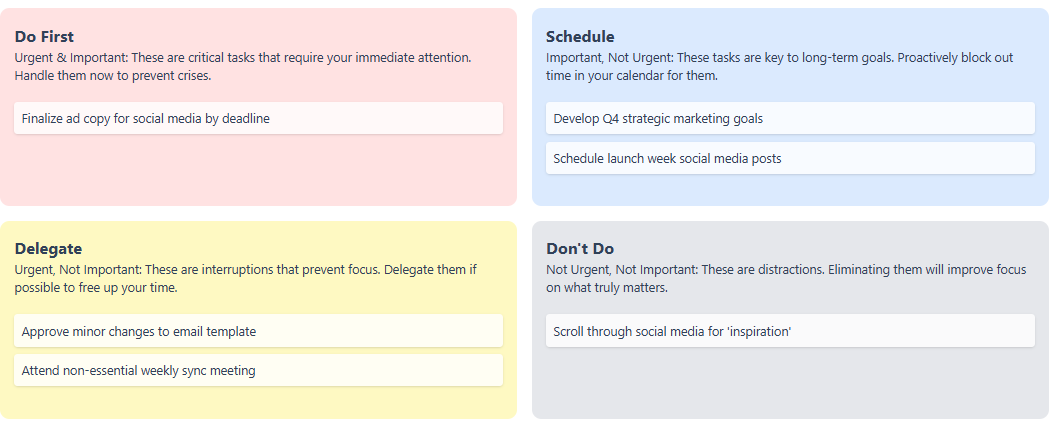
- Categorize with clarity by sorting tasks into four visual quadrants: Do, Schedule, Delegate, and Delete.
- Transform strategy into action by creating a definitive plan with specific notes, deadlines, and next steps for each task.
- Gain deeper insights with an AI-generated report that analyzes your plan, identifies potential risks, and offers strategic recommendations.
How to Get Started in Minutes
Accessing the new planner is simple for all eligible users. This feature is available to Visual Paradigm Online users with a Combo Edition (or higher) subscription, and to Visual Paradigm (Desktop) users with a Professional Edition (or higher) license and active maintenance.
For Visual Paradigm Online users:
Simply navigate directly to the Eisenhower Matrix Task Planner to get started.
For Visual Paradigm (Desktop) users:
Open your desktop application, navigate to Tools > App from the main menu, and select the Eisenhower Matrix Task Planner from the list.
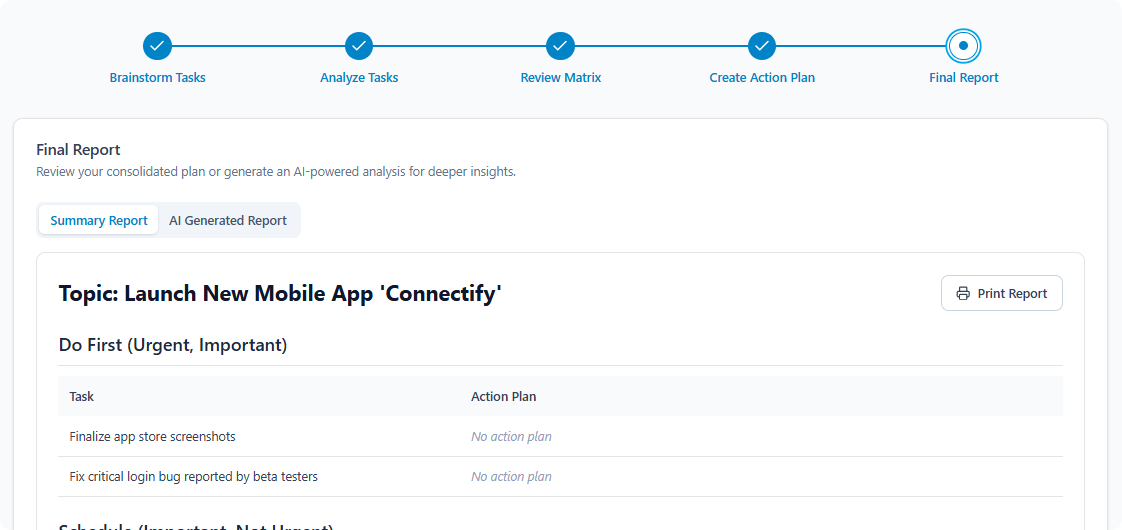
Once you’re in the app, follow the simple five-step wizard:
- Brainstorm: Define your topic and list all relevant tasks.
- Analyze: Categorize each task by its urgency and importance.
- Review: See your tasks laid out in the visual four-quadrant matrix.
- Plan: Add concrete next steps and notes to your tasks.
- Report: Generate a summary or an insightful AI-powered report.
Ready to Reclaim Your Focus?
Stop letting your to-do list dictate your day. The Eisenhower Matrix Task Planner empowers you to move from a reactive state to a proactive one, ensuring your efforts are aligned with your most significant goals. Gain the clarity you need to make smarter decisions and drive meaningful progress.
For a detailed guide on all features, visit our Eisenhower Matrix Task Planner documentation.