


Creating detailed and accurate UML class diagrams is a cornerstone of effective system design, but it has traditionally been a manual, time-consuming process. Today, we’re thrilled to change that. We are launching the brand-new AI-Assisted UML Class Diagram Generator, a powerful tool designed to transform your ideas into complete diagrams with the power of artificial intelligence. This new feature for AI UML generation accelerates your workflow, allowing you to focus on design innovation rather than manual drawing.
Addressing the Challenge of Manual Diagramming
For years, software architects and developers have spent countless hours meticulously defining classes, attributes, methods, and their complex relationships. This manual process can be a bottleneck in the early stages of a project, slowing down development and making it difficult to iterate on designs quickly.
Identifying all necessary components, ensuring correct syntax, and maintaining consistency across a large diagram requires deep expertise and intense focus. Our goal was to eliminate this friction and make system design more intuitive and accessible for everyone.
Introducing the AI-Assisted UML Class Diagram Generator: From Idea to Diagram in Seconds
To solve these challenges, we built an intelligent tool that acts as your expert design partner. By simply describing your system in plain language, you can generate a robust starting point for your class diagram, which you can then refine through a guided, step-by-step process.
The new generator allows you to:
- Generate Instantly: Describe your system concept, and let the AI create a comprehensive class diagram structure, including classes, attributes, methods, and relationships.
- Refine with Guidance: Use an intuitive 10-step wizard to manually add, edit, or remove any element of your diagram, ensuring it perfectly matches your requirements.
- Validate Your Design: Get an AI-powered analysis report that reviews your diagram for potential improvements, identifies design patterns, and highlights key class responsibilities.
- Export with Ease: Generate and export your diagram as a PlantUML file (.puml) or an SVG image, making it easy to integrate into your documentation, wikis, and version control systems.
How to Access and Use the New Generator
Getting started is simple. The AI-Assisted UML Class Diagram Generator is now available to all our users. Here’s how you can access it:
- For Visual Paradigm Online Users (Combo Edition or higher): Simply navigate directly to the AI-Assisted UML Class Diagram Generator to begin.
- For Visual Paradigm Desktop Users (Professional Edition or higher with active maintenance): Open your desktop application, go to the Tools > App menu, and select the generator from the list.
Once you’ve opened the app, the workflow is straightforward:
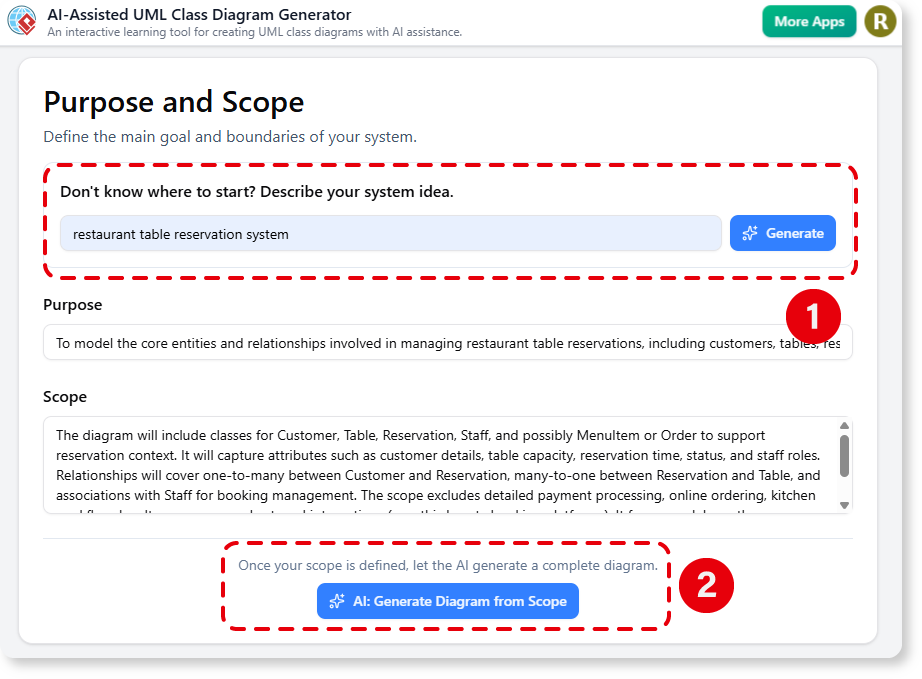
- Define Your Scope: Start by describing your system idea. The AI will help you draft a clear purpose and scope to guide the design.
- Generate the Diagram: With your scope defined, click the “AI: Generate Diagram from Scope” button to create the initial class diagram.
- Review and Refine: Use the step-by-step wizard to walk through each component—classes, attributes, methods, and relationships—and make any adjustments needed.
- Analyze and Export: In the final steps, generate an AI analysis report for design insights and export your completed diagram in your preferred format.

Ready to Supercharge Your System Design?
The AI-Assisted UML Class Diagram Generator is more than just a drawing tool—it’s an intelligent partner that streamlines your entire design process. By automating the most tedious parts of UML creation, it frees you up to solve bigger challenges and bring your architectural vision to life faster than ever before.
For more detailed information and advanced tips, you can learn more in our detailed guide.